AI Automation for Documents, Invoices, and Workflows
AutoGo helps finance, AP, AR, and shared services teams automate repetitive operational processes using AI agents, document intelligence, and email-based workflows — on managed cloud infrastructure.
Why Finance and Operations Teams Get Stuck on Documents
Finance teams spend hours every day keying in invoices, matching POs, processing claims, and forwarding email attachments. Traditional RPA scripts break when layouts change. Hiring more headcount doesn't scale. The bottleneck is rarely the people — it's the document.
Product Overview
AutoGo combines AI document intelligence, email-triggered workflows, and human-in-the-loop review to automate the document-heavy parts of your operations. AI agents read PDFs, invoices, and emails, extract structured data, route exceptions to humans, and push results into your downstream systems — with full audit trail and managed cloud hosting.
Inside AutoGo: The Aurix Engine
Every AutoGo agent workflow runs on Aurix, our opinionated multi-agent runtime. An Orchestrator plans each step, small purpose-built agents do the work, tools are bounded and authenticated through the AI API layer, and an Evaluator scores every output before it acts.
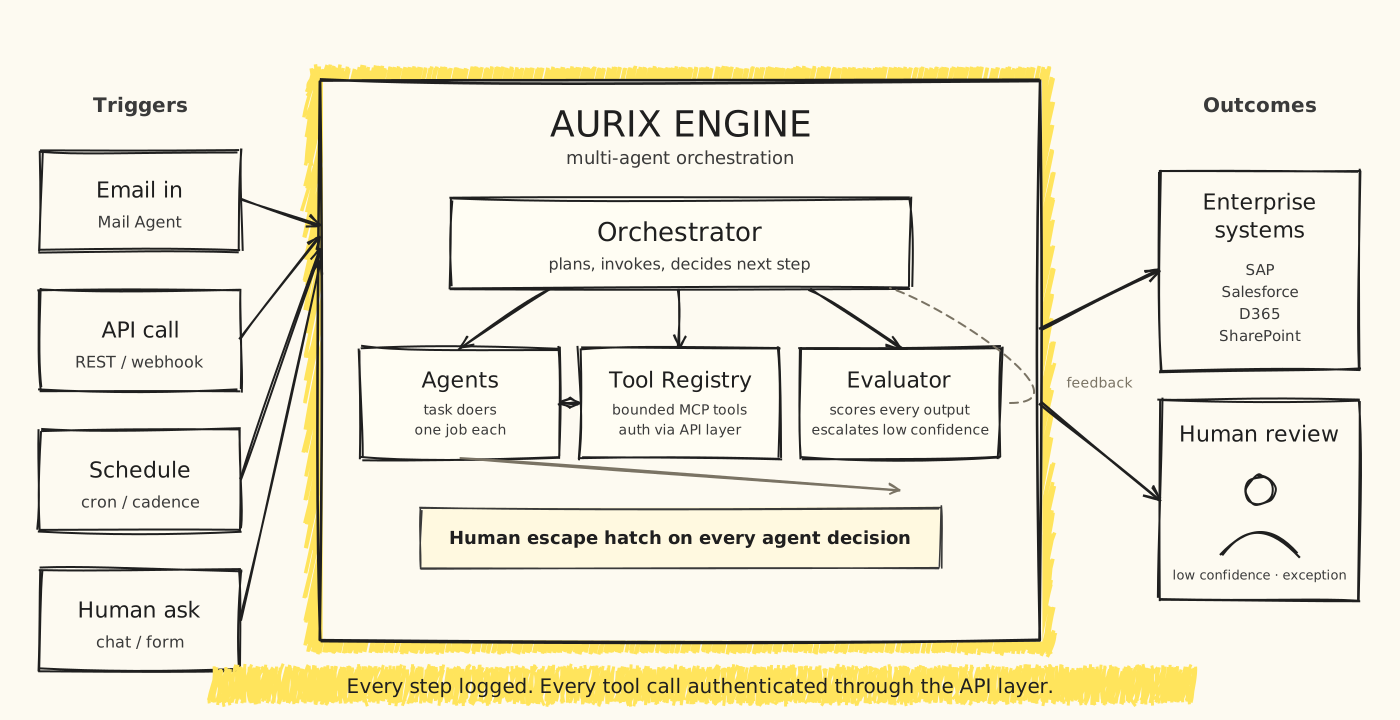
Every step logged. Every tool call authenticated through the API layer. Human escape hatch on every decision.
Who It Is For
Key Features
AI Document Extraction
Extract structured data from invoices, POs, receipts, and forms — even with varying layouts.
Invoice Processing Automation
End-to-end AP automation: capture, validate, match, and post invoices to your ERP.
Email-Based Job Requests
Send a PDF to a dedicated email; AutoGo processes it and replies with structured output.
Workflow Automation
Multi-step business processes with approvals, branching, and integrations.
Azure Document Intelligence
Built on Azure AI services with custom models trained on your document types.
Human Review Workflow
Low-confidence extractions are routed to a human reviewer with a clean UI.
Job Status Tracking
Real-time dashboard showing queued, processing, completed, and failed jobs.
Automation Queue Management
Priority queues, retries, and SLA tracking per automation type.
Managed Cloud Hosting
Fully managed on Azure — we handle infrastructure, scaling, and security.
Multiple Automation Agents
Deploy multiple agents for different document types or business units, all managed centrally.
How It Works
Identify a Repetitive Process
Start with one document-heavy workflow — typically invoice processing or claim handling.
Train an AI Agent
We configure or fine-tune an AI agent on your document samples and rules.
Integrate Your Inputs
Connect email, SFTP, file shares, or APIs as input channels for the agent.
Route Exceptions to Humans
Low-confidence cases land in a review queue; AutoGo learns from corrections.
Push Results Downstream
Structured output flows into your ERP, accounting, or operational system.
Benefits
Use Cases
Accounts Payable Automation
Receive supplier invoices by email, extract line items, match to POs, and post to ERP.
Receipt and Claims Processing
Employees email receipts; AutoGo extracts data and creates expense claims automatically.
Sales Order Automation
Customer POs arrive as PDFs; AutoGo creates sales orders in your system.
Email-Triggered Job Requests
Internal teams send structured email requests; AutoGo executes the workflow and replies.
Technology & Integrations
Frequently Asked Questions
How is AutoGo different from traditional RPA?+
Traditional RPA scripts break when document layouts or screen positions change. AutoGo uses AI document intelligence that adapts to layout variations and improves over time through human-in-the-loop review.
Do I need to train the AI myself?+
No. BlueAura configures the AI agent based on your document samples and refines it during onboarding. You can also flag corrections in the review UI, and the agent learns from them.
Can AutoGo handle Malay, English, and Chinese documents?+
Yes. AutoGo supports multi-language documents common in Malaysian business operations.
How does AutoGo integrate with my ERP?+
AutoGo can push extracted data via REST API, SFTP, database write, or RPA-style UI automation, depending on your ERP's capabilities.
Is AutoGo deployed as SaaS or on-premise?+
AutoGo is offered as managed SaaS on Azure. For organisations with data residency requirements, we offer private cloud and on-premise deployment options.
AutoGo by Industry
See how AutoGo applies to specific industries.
Related
Ready to explore AutoGo?
Schedule a walkthrough with our team to see how AutoGo fits your workflow.