
When Agentic Actually Earns Its Complexity: Building Your First AI Agent on AutoGo Aurix
Two weeks ago I wrote Not Every Automation Needs AI, and Not Every AI Needs to Be Agentic. It was, by a comfortable margin, the most-shared post we have ever put out. What surprised me was the follow-up question I kept getting.
"OK. So when IS agentic the right answer, and how would we actually build one?"
Fair question. The framework post argued that most enterprise automation should not be agentic. What it did not do is walk through the workflows where an agent genuinely earns its complexity, and how you build one that will not embarrass you in production six months in. That is what this post is for.
We ship these on AutoGo, powered by our Aurix multi-agent engine. I am going to talk about both in plain terms, with a worked example, and with the three failure modes that kill most enterprise agent projects.
When agentic actually earns its complexity
Three markers. When all three are present, you are in agentic territory. When only one or two are present, you are almost always better off with the LLM extraction plus rules pattern from the earlier post.
One. The workflow has real branching decisions. Not "if amount is over ten thousand, escalate." That is a rule. Agentic territory is "look at this weird invoice, check the supplier history, cross-reference the master data, and decide what to do next." The agent is making a judgement, not executing a script.
Two. The next step depends on the last step in ways you cannot fully specify up front. A traditional workflow is a decision tree you can draw on paper. An agentic workflow branches on things the system observes as it goes. If you can draw the whole thing on paper as a flowchart, you do not need an agent.
Three. The payoff justifies the operational overhead. Agents cost three to five times more to build than a straight LLM pipeline, and their runtime cost grows non-linearly with traffic. If the workflow only touches 200 cases a month and each one takes an analyst 15 minutes, the agent will pay back over years, not months. If the workflow touches 5,000 cases a month and each one is a genuine investigation, the payoff is real.
Take those three together and the picture is clear. Agentic AI is not for the happy path. It is for the exception queue.
Introducing Aurix, our multi-agent engine
Aurix is the engine that runs every AI agent workflow on AutoGo. It is not a chatbot framework. It is not "put a system prompt in a text box and hope." It is an opinionated multi-agent runtime designed for enterprise deployment on Microsoft Azure.
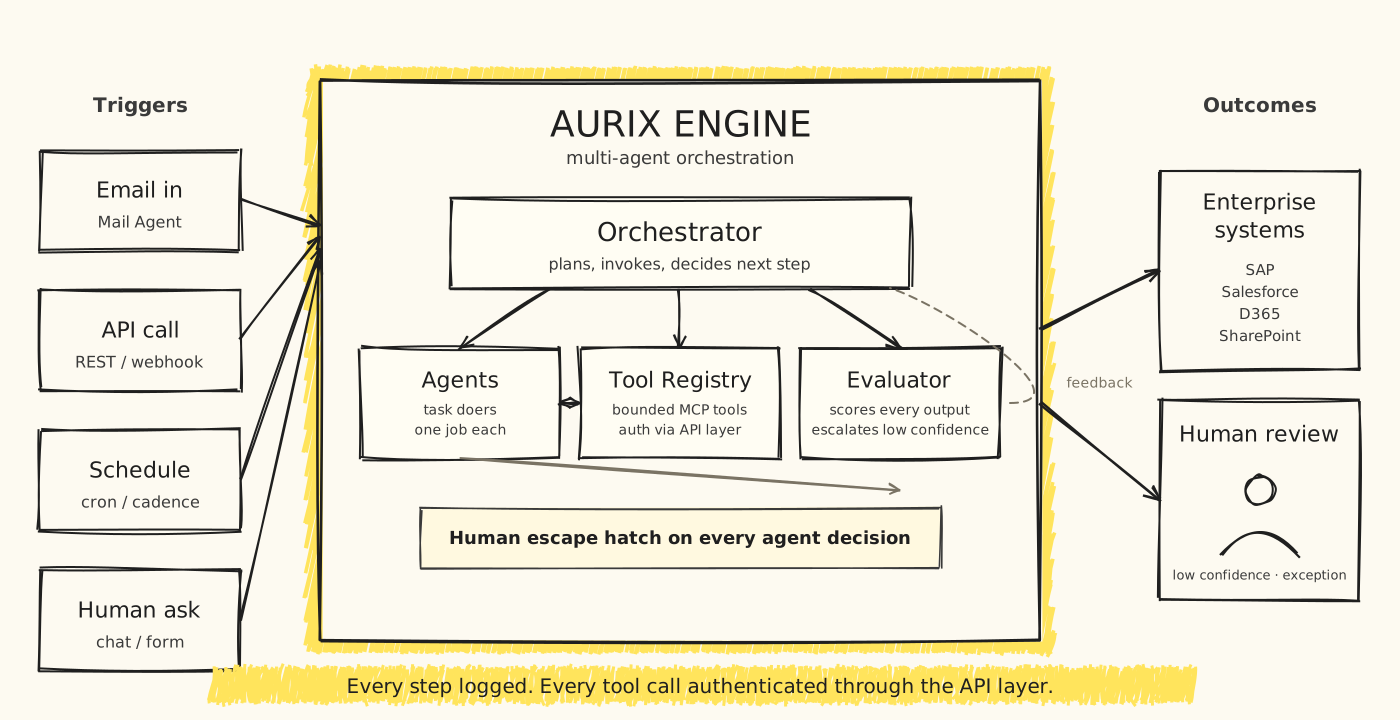
Four things sit inside Aurix.
Orchestrator. The planner. When a request arrives, the Orchestrator decides what to do next, whether to invoke an agent, which agent, and with what context. It is the difference between a system that "responds to a prompt" and one that runs a workflow. Orchestrators are also where most naive agent builds fail. Without one, agents call each other in loops and the whole thing melts under load.
Agents. The task doers. Each agent has one job, well specified. We do not build "the AP agent." We build "the supplier lookup agent," "the master data cross-reference agent," "the exception classification agent." Small scope, testable output, replaceable independently. When a model provider updates their base model, only the affected agents need re-evaluation.
Tool Registry. The set of things agents are allowed to do. Every enterprise action, whether reading from SAP, writing to Salesforce, sending an email, or querying a data warehouse, is a bounded tool. Every tool call is authenticated through the AI API layer we wrote about in the last post. No agent has raw access to a database. The tools they can call are versioned, permission-checked, and logged.
Evaluator. The one everyone skips at their peril. Every agent output is scored against a rubric before it acts. Low-confidence outputs escalate to human review. High-confidence outputs execute. Scores are stored so that six months in, we can see the "invoice classifier" agent's accuracy dropped from 96% to 89% after a model provider updated their base model, and we can retrain against it.
There is also a human escape hatch on every decision, always. Not a nice-to-have. An architectural requirement. Any agent decision can be paused, escalated, or overridden by a reviewer with a click.
Worked example: the AP exception queue agent
Let me walk through the one I hinted at in the Aug 26 post.
In the "right pattern" for AP, an email watcher (deterministic) routes attachments to an LLM extraction pipeline (bounded task) that outputs structured data with confidence scores. A rules layer (deterministic) checks confidence, matches against PO, and either posts or routes to human review.
That handles 92% to 95% of AP invoices in a well-tuned deployment. The remaining 5% to 8% is the exception queue. It is where an agent earns its keep.
The exception queue holds invoices that failed the confidence check or the PO match. Historically, a finance analyst opens each one, chases the supplier, checks the payment history, cross-references against the master vendor list, and decides whether to auto-post with a note, escalate, or reject. Fifteen to twenty minutes per invoice, done poorly under time pressure, and quality varies by who is on shift.
An AP exception agent on Aurix looks like this.
The Orchestrator receives the exception with a reason code: confidence low, PO not found, amount mismatch, unknown supplier. Based on the reason, it invokes different agents.
For "unknown supplier," it calls the Supplier Lookup Agent. This agent has one job: given the supplier name on the invoice, find whether they exist in the vendor master, with what confidence, and whether there is a probable near-match. It has three tools: search_vendor_master, get_supplier_history, get_bank_account_metadata. It returns a structured verdict.
For "PO not found," it calls the PO Reconciliation Agent. That agent tries different PO search strategies (loose match, prefix match, date-range match) and returns candidate POs with confidence scores.
The Orchestrator collects these agent verdicts, cross-references them, and produces a proposed action. The Evaluator scores the proposed action against a rubric. Was the reasoning coherent? Were the tools called correctly? Does the confidence align with the historical accuracy of this workflow?
If the score clears the threshold, the action executes. If not, it goes to a human reviewer with the full trace attached. The reviewer sees not just the invoice, but the agent's reasoning, the tools it called, the data it retrieved, and its final proposal. Approve, modify, or reject. Every decision is logged. Every model call is retained for evaluation.
Total per-exception cost on a well-scoped Aurix deployment is a few cents in tokens, roughly ten seconds of reviewer time when escalation is needed, and about half the exception queue clearing without human touch. The remaining half clears faster because the reviewer starts with the agent's investigation already done, not from a blank screen.
What actually kills agent projects in production
I have watched enterprise agent builds go from proud demo to embarrassed rebuild many times. The failure modes cluster around three things.
Bad Orchestrator design. If your Orchestrator is a language model with a giant system prompt, you have not built an Orchestrator. You have built a chatbot that thinks it is an Orchestrator. Real Orchestrators are code. They call the model for judgement when judgement is needed. They do not defer every routing decision to a system prompt and hope.
No tool boundaries. The instinct is to give agents wide access and let them figure things out. Every one of these builds fails a security review. The right pattern is bounded tools through the AI API layer, versioned, permission-checked, logged. Small operations that compose. A Postgres MCP server with full query access is not a tool. It is a liability.
No Evaluator. This is the one that always surprises non-technical stakeholders. If you cannot score your agent's output automatically, you cannot detect the day it starts producing garbage. Enterprise agents drift. Model providers update base models. Prompts stop working the way they did. Without an Evaluator running against a stable rubric, you find out three weeks too late, usually from a business user complaining.
Get those three right and the agent has a fighting chance. Get them wrong and you have shipped a mystery box.
How you actually build one on AutoGo
The AutoGo Agent Builder is where our clients spec, deploy, and monitor Aurix agents. In practical terms, an agent build looks like this.
Spec. Write the agent's one job in a sentence. If the sentence has "and" in the middle, split it into two agents. Name the tools it needs. Three to six is a good target. Ten is a smell. Define the rubric the Evaluator will score against.
Wire. Register the tools in the Tool Registry. Point them at the API layer functions that already exist in your enterprise stack. If the tool does not exist yet, that is a separate integration project, and it should happen before agent work, not during.
Rehearse. Run the agent against a stable set of historical cases with known correct answers. Score the outputs. Iterate on the prompt and the rubric until you see 90%+ agreement with the known answers.
Deploy behind Evaluator. Turn the agent on in production with all outputs going to human review, not auto-execution. Let it run for two weeks. Look at what it gets right and what it gets wrong. Adjust.
Raise the auto-execution threshold slowly. Once the Evaluator scores are trustworthy on real production traffic, start auto-executing high-confidence cases. Keep everything else routed to human review with the trace attached.
That is how you get an agent into production without embarrassing yourself. It is more work than "put a prompt in a text box." It is much less work than the failed six-month agentic transformation programme your competitor is currently trying to explain to their board.
The bottom line
Agentic AI is real. It is not the answer to every automation question, and it is not the answer to most of them. But when the workflow has real branching decisions, when the next step depends on what the system just observed, and when the payoff justifies the operational overhead, an agent will out-perform anything else.
Do it with the right runtime. Orchestrator that is code, not a prompt. Agents that do one thing each, well. Tools that are bounded and authenticated through the API layer. Evaluator that scores every output against a rubric.
That is Aurix. That is what runs every AutoGo agent workflow in production today.
If you have an exception queue at your bank, your GLC, or your enterprise finance function that eats too much analyst time and produces inconsistent quality, that is the workflow where an agent earns its complexity. Start there. Not with the happy path. Not with the demo. With the exception queue.
Related reading:
- Not Every Automation Needs AI, and Not Every AI Needs to Be Agentic: the framework post this sequel answers
- Your Enterprise Data Is Already Leaving the Building: the AI API layer that Aurix tool calls run through
- AutoGo: the product page for the automation platform
- Enterprise Platform on Microsoft Azure: the Azure architecture we build on
Get one BlueAura post a week
Practical guides on AI automation, LHDN e-Invoice, and enterprise software for Malaysian businesses. No spam, unsubscribe anytime.
Ready to transform your business?
Let's discuss how BlueAura Technology can help accelerate your digital transformation journey.
Get in touch